Sync lyrics word by word in your browser.
Tap Space to set timestamps, split words for karaoke playback, and export directly to Enhanced LRC and Apple Music TTML. Free, local, and private.
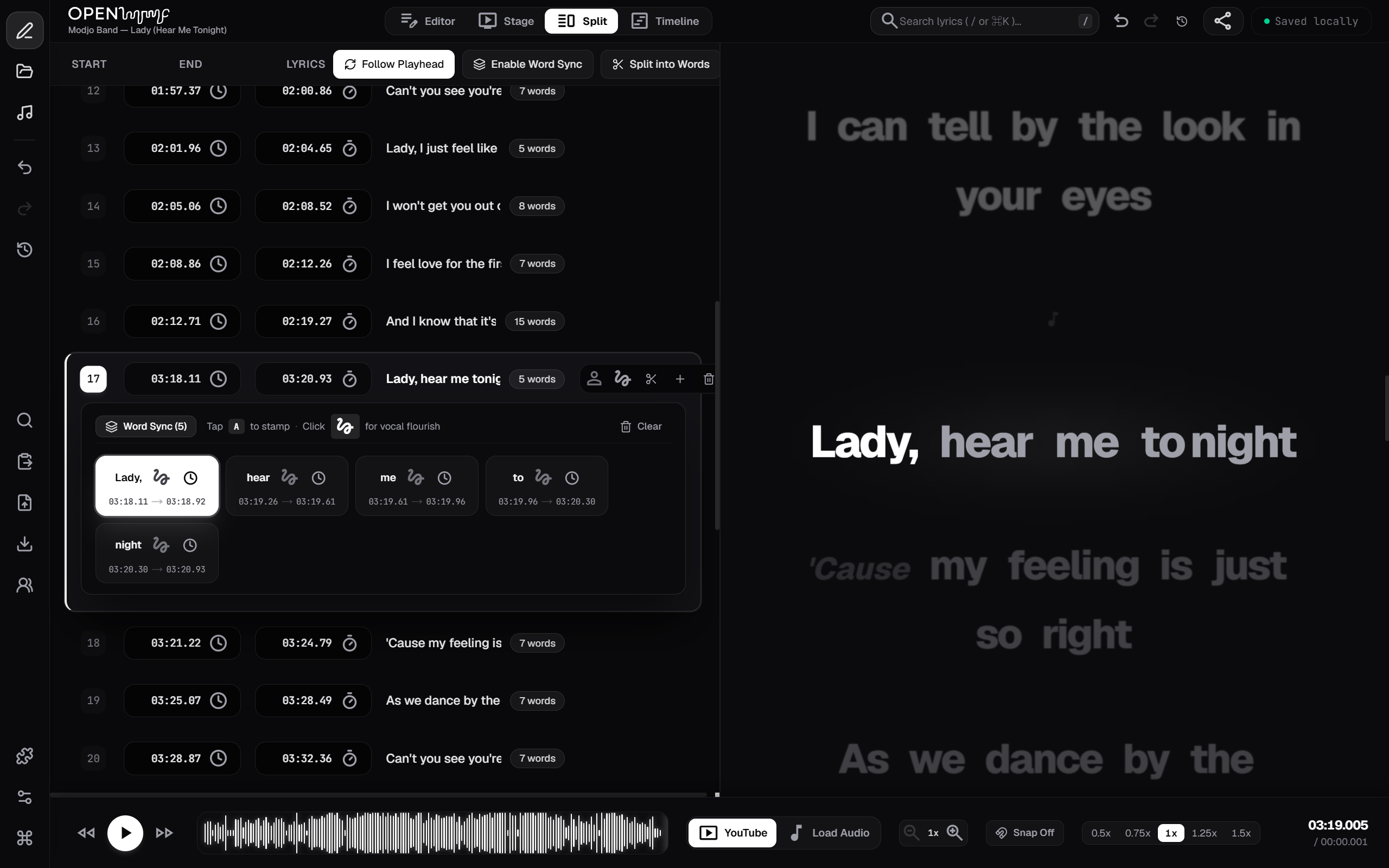
Everything you need to time lyrics.
Simple tools to match words to music, edit timestamps, and export clean files.

Fullscreen stage mode
Put lyrics on a TV, tablet, or stage screen. Words scroll smoothly as the song plays, with clear countdowns before each verse begins.
Word-by-word timing
Highlight each word or syllable as it is sung. Perfect for karaoke tracks and glowing lyrics.
Standard file exports
Export standard .lrc files for Spotify and media players, or .ttml files formatted for Apple Music.
Runs on your computer
Audio decoding happens directly in your browser. Nothing is uploaded to a server, no account is needed, and your songs stay on your computer.
Over 9 million songs already timed.
You rarely have to start from scratch. OpenLyryc connects directly to LRCLIB, an open community database with over 9 million timed songs.
Search, load, and edit in one click.
When you load a song in the studio, matching lyrics can be pulled in automatically with timestamps already in place. You can fix small timing errors, adjust words, or export straight away. If your track is not in the library yet, time it once and save it for everyone else.
Expanding support for many languages
OpenLyryc works with songs in dozens of languages. From English and Spanish to Hindi, Japanese, Arabic, and Korean — every word stays sharp, properly spaced, and locked to the music.
How it works in three steps.
Load your music
Drop any audio file from your computer or paste a YouTube link. Paste your lyrics into the editor.
Tap along with the song
Press play and tap Space when each line begins. Use the bracket keys [ and ] to nudge timing backward or forward.
Save and export
Download your timed .lrc or .ttml file, or open stage mode to see how it looks on screen.
Keyboard shortcuts for fast timing.
Keep your hands on the keyboard. Most songs can be timed in one play through.
Mark the line
Taps the start time for the active line and advances to the next one automatically.
Nudge timing
Shift timestamps forward or backward by 10 milliseconds to get the sync exact.
Split words
Divides a line into separate words for syllable-by-syllable karaoke timing.
Scrub waveform
Jump directly to any beat, drum drop, or vocal pause on the visual waveform.
Made for anyone working with lyrics.
From releasing music on streaming services to performing live on stage.
Musicians & Producers
Deliver timed lyrics with your song release so they appear on Spotify and Apple Music without recurring middleman costs.
Video Editors
Generate subtitle files for Premiere, DaVinci Resolve, or Final Cut without keyframing text lines one by one.
Bands & Performers
Turn any laptop, tablet, or stage display into a live prompter that scrolls smoothly with the music.
Karaoke Creators
Time syllables and word fills for sing-along videos and live karaoke tracks.
A dedicated timing tool.
Traditional video editors and paid web tools make lyric timing slow and frustrating.
Manual Timeline Cutting
Dragging text layers by hand takes hours for a single song. Project files are heavy, and they cannot export standard .lrc or .ttml files for Spotify.
Monthly Fees & Cloud Uploads
Most web tools require monthly subscriptions, restrict downloads behind paywalls, and force you to upload unreleased audio to third-party cloud servers.
Fast, Private, and Free
Runs 100% in your browser. Tap Space to time an entire song in under five minutes, with standard exports for Spotify, Apple Music, and video editors.
Frequently asked questions.
Quick answers about file formats, browser privacy, and how OpenLyryc works.
Is OpenLyryc completely free to use?
Yes. OpenLyryc is free and open-source. There are no subscriptions, trial periods, accounts, or file export limits.
Do my audio files get uploaded to a server?
No. Audio decoding runs entirely inside your browser using the Web Audio API. Your songs never leave your device.
Where can I use exported files?
Standard .lrc files work with Spotify, Plex, foobar2000, and media players. Word-synced .ttml files are ready for Apple Music and karaoke players.
Can I load existing LRC files to fix timing?
Yes. Drop any .lrc file into the editor to adjust timestamps, fix typos, or split lines into word-by-word timing.
Start timing your music.
No signup required. Drop an MP3, WAV, or paste a YouTube link to begin.